Our General Workflow

create_csv Explained
Running the script will produce a CSV of their trial-by-trial data per participant. These should be kept local and are not stored on Dropbox (see Data Management for more information)
create_csv should be run on the testing computer only
Make sure that the “Kinarm-Analysis-Scripts.3.1.4” folder is added to the path when calling create_csv, or you will get an error
The script currently looks for the “TARGET_ON” and “TARGET_REACHED” event codes and pulls all data between that window — we will keep this standardized across tasks
Check the docstring under the create_csv function name for the full list of parameters and how to call it
Creating your own create_csv:
Every experiment will likely need its own version of create_csv. Start from the template create_csv file on the desktop, copy the script along with the entire create_csv file into your own task program folder, and rename it
create_csv_<YourExperiment>See create_csv_hayashi as a worked example of a modified version
Clean Coding Practices
Writing clean code is an essential skill to have, not only does it help other lab members understand your code, it will help your future self as well. In the spirit of readability and clean coding, here are some important aspects to apply to any analysis or pre-processing code you write!
Use Google-style docstrings — clearly specify inputs and outputs for every function
Give meaningful names to your code:
Variables names should be in
lowercase_with_underscore, using descriptive nouse to tell us what the variable is. E.g.n_trialsis better thanntFunction names should be in
lowercase_with_underscoreand start with a verb to describe what the function does. E.g.decode_data()is better thanfunc1()Be consistent when using abbreviations, if you abbreviate “
reaction time” asrt, userteverywhereChange random numbers into variables. E.g. when converting meters to centimeters,
m_to_cm = 100is better than100
Use within-code comments to provide clarity to specific lines of code, use this sparingly as good naming should reduce the amount of comments you need to write
Follow the “Mafia principle”: a function should know only enough to do its own job, nothing more. Keep the arguments it needs to a minimum
Look back and clean up! Delete any unnecessary comments or unused variables, rename variables, and organize your code after you stop working
For more tips and details, check out Diedrichsen’s Writing Clean Code and Google Python Style Guide
Practical Notes
Event codes are not currently exported by default — any event codes you need must be added to the CSV manually.
(x, y) vs. (x_global, y_global): task protocol coordinates treat the middle of the screen as (0,0), but global coordinates have an origin at the bottom middle of the screen. Therefore, the screen middle is roughly (0, 19 cm) in global space. When comparing reach trajectories to target locations, use the global coordinates (also available in the target table within the Kinarm file). If your trajectory/target overlay looks off, check whether you’re mixing these two coordinate systems.
cm vs. m: We convert position to cm rather than m. Because of CSV size limits we round to a fixed number of decimal places, and cm gives more useful precision at that rounding than m (fewer trailing zeros). Data is currently rounded to 5 decimal places, a value chosen to balance precision against CSV file size. Adjustable in the create_csv script if needed.
Visual latency: per the Dexterit-E 3.11 user guide (section 15.6), average visual latency at the center of the screen is about 18–27ms. The lab decided this isn’t currently significant enough to correct for, but keep it in mind for latency-sensitive analyses.
File size / session length limits: max file size is roughly 1.8 GB; a max safe session duration hasn’t been established yet. Long sessions (~2.5 hrs) have triggered exam-finalization and target-computer crashes in the past.
Dexterit-E Explorer: use this software to review data files as a sanity check if things don’t seem correct. This shows time-based graphs of data collected, including time-stamped event markers (extremely useful!). Software is on the KINARM computer and can be externally downloaded on your computer.
KINARM Data Structure — Quick Reference
This is a quick look-up / cheat sheet of where the most important data can be found within the kinarm data structure. This is the structure that is created within matlab, after exam_load is called. Make sure to also call KINARM_add_hand_kinematics() on the data structure to have all measures available.
All data is within ‘c3d’ struct
Each ROW in the c3d struct is data for one trial
Below is what the Workspace and Command Windows look like. Matlab variable names are based on this:
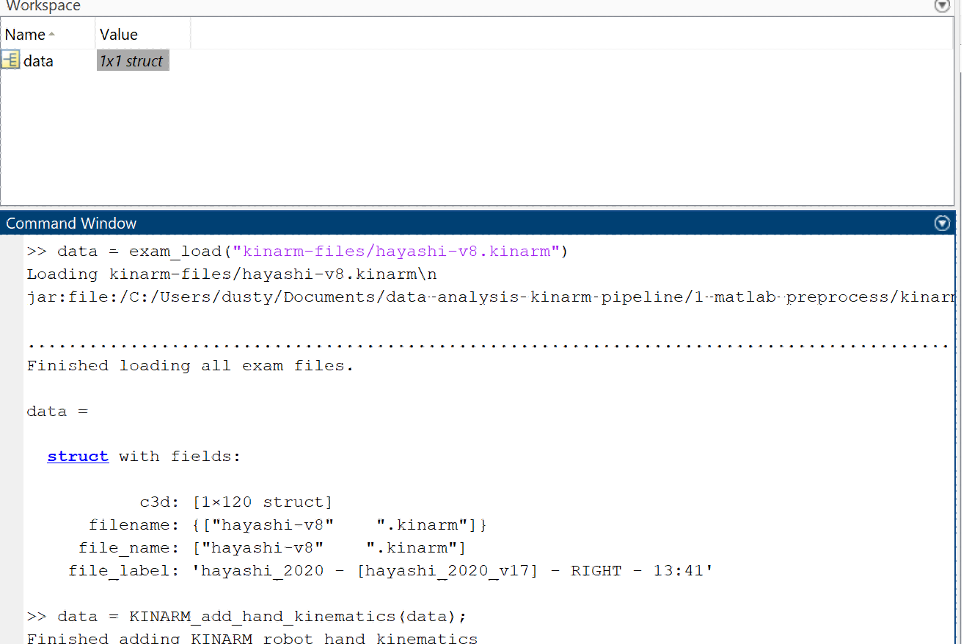
To call the specific data that you want, you have to index by trial number into the data structure. This can be done by doing data.c3d(n), where n is the trial number. If you called the output of exam_load something besides data, just replace the word in the data call with the name.
Here are some examples of the most common that you’ll want to export, how to access the field within the data structure, and how to access it within matlab.
Kinematic Data (all samples for the nth trial)
| Measure | Field | Matlab variable |
|---|---|---|
| X Position | Right_HandX | data.c3d(n).Right_HandX |
| Y position | Right_HandY | data.c3d(n).Right_HandY |
| X velocity | Right_HandXVel | data.c3d(n).Right_HandXVel |
| Y velocity | Right_HandYVel | data.c3d(n).Right_HandYVel |
| X acceleration | Right_HandXAcc | data.c3d(n).Right_HandXAcc |
| Y acceleration | Right_HandYAcc | data.c3d(n).Right_HandYAcc |
Trial Information
| Measure | Field | Matlab variable |
|---|---|---|
| TP number | TP | data.c3d(n).TRIAL.TP |
| Trial number | TRIAL_NUM | data.c3d(n).TRIAL.TRIAL_NUM |
| Sample rate | RATE | data.c3d(n).HAND.RATE |
| Load row | Load | data.c3d(n).TP_TABLE.Load |
Tables
Tables are a snapshot of the trial protocol as it was on that specific trial. Unless the protocol changes mid-experiment, the table contents will be identical across trials — but you still need to index by both trial number AND TP number to pull the value that was actually used on that trial. Replace <Field> with the field you would like to access:
| Measure | Matlab variable |
|---|---|
| Target Table | data.c3d(n).TARGET_TABLE.<Field> |
| Load Table | data.c3d(n).LOAD_TABLE.<Field> |
| Task-Wide Parameters | data.c3d(n).TASK_WIDE_PARAMS.` |
| TP Table | data.c3d(n).TP_TABLE.<Field> |
Events
Always make sure to match the label with the times for each trial. KINARM has built-in event codes that can appear at any order, so don’t just rely on indexing from previous trials to match labels and times
| Measure | Matlab variable |
|---|---|
| Event Label | data.c3d(n).EVENTS.LABELS |
| Event Time | data.c3d(n).EVENTS.TIMES |