Before the Experiment
Below are some basic principles to follow when testing participants. There are also examples of task instructions and debriefing questions. Adjust them to suit the purposes of your specific study.
[We also want a page or section in here about how to calibrate so that there is a 1:1 relationship between stylus position and its representation on the monitor (when no perturbation).]
Consent form
Ask:
Are you generally healthy and between 18-35 years old? How old are you?
Do you have normal to corrected-to-normal vision?
Do you have any known history of neurological impairment?
Are you fluent in written and spoken English?
What is your hand dominance?
Write subject ID on the top right-hand corner of the consent form.
Note: There should be plenty of consent forms printed out and at least $50 cash in the lab’s file cabinets. Let the lab manager know if we are running low on either consent forms or petty cash. Also, remember to keep an up-to-date copy of the consent form in your projects directory so that you can also print out a copy if need be.
KINARM Pre-experiment checklist
Sanitation: Clean the semi-transparent mirror and subject display ONLY with a microfibre cloth. Disinfect all components that comes into contact with the subject (e.g. chair, vision-blocking bib, forehead rest, robot handles). Cloth and disinfectant wipes can be found in the KINARM drawer.
Chair: Subject should be carefully pushed as close as possible to the table-top and is centre and directly facing the robot. Seat height can only be adjusted with the wired remote control at the back. Once subject is comfortable, you can lock the chair with the hand lever on the right side of the chair.
If battery not charged (indicated by a red left LED, on the remote control), plug in the charger into the chair
If the left LED is not lit and the centre LEDs flash green, this indicates battery has entered stand-by mode. Charge the battery for at least 5s and then unplug charger will re-activate the battery.
Please always keep the battery charged (do not let the battery become completely discharged as this will reduce the battery health).
Vision Blockers & Curtain: Ensure the vision blocker is slid fully inwards to block the view of the subject’s arms and hands. A Vision-Blocking bib can be fit around the subject’s neck as well. If blackout curtains are needed, gently slide them along the rails and do not pull down on them as it may fall.
Handle: Instruct the subject to grab the robot handle as high on the handle as possible without touching the linkage (this is to ensure the sensors can detect their hand)
Power On: Flip the following 3 buttons, it should then beep 5 times.
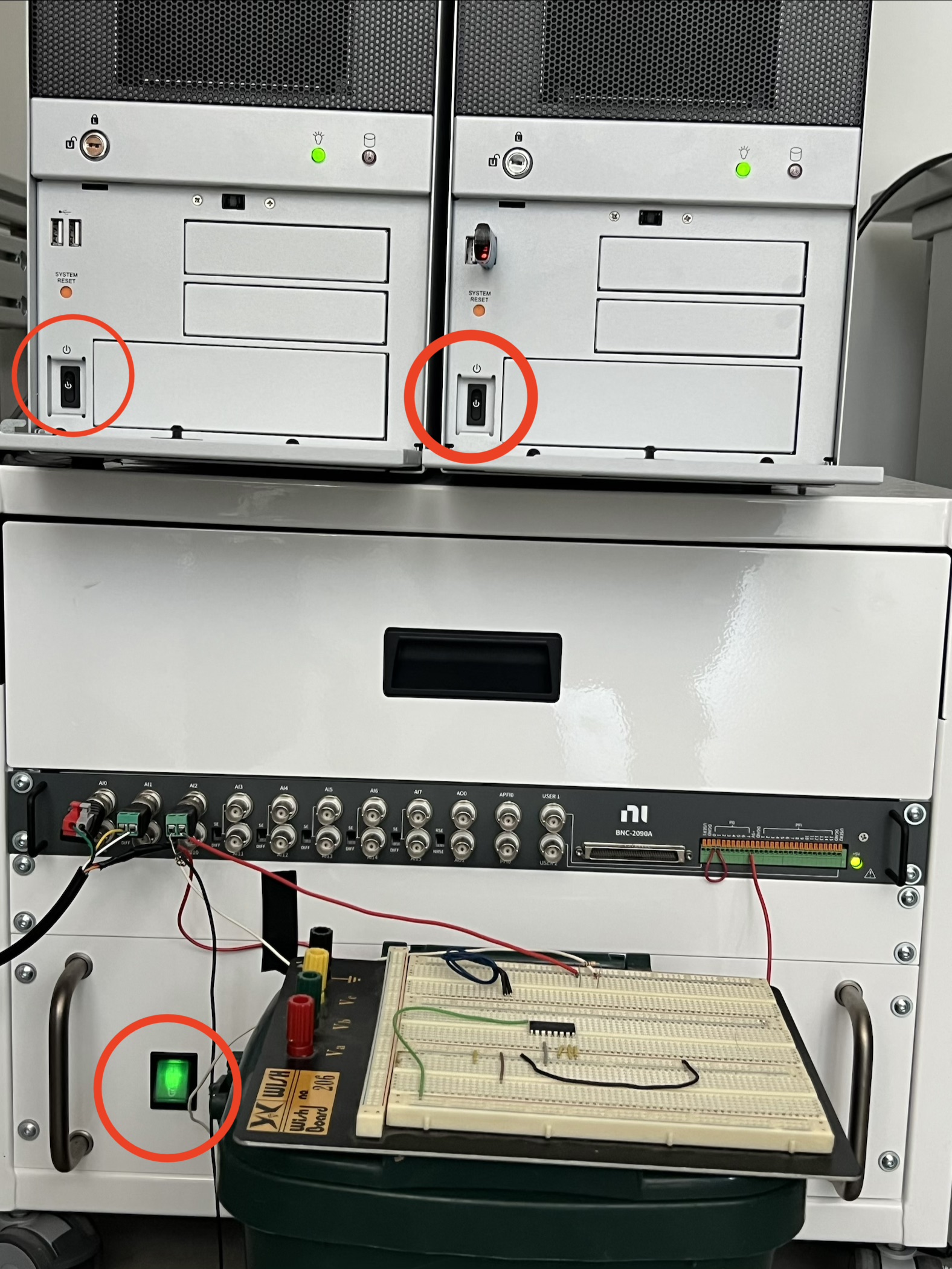
Handle Tightening: See the Kinarm End-Point hardware guide, section 7.12. It’s written as an installation guide, but it also covers what to do if the handle feels loose. The guide says to use a 4mm hex key — in our setup, you actually need a 6mm key.
Tablet Pre-experiment checklist
Turn off the lights
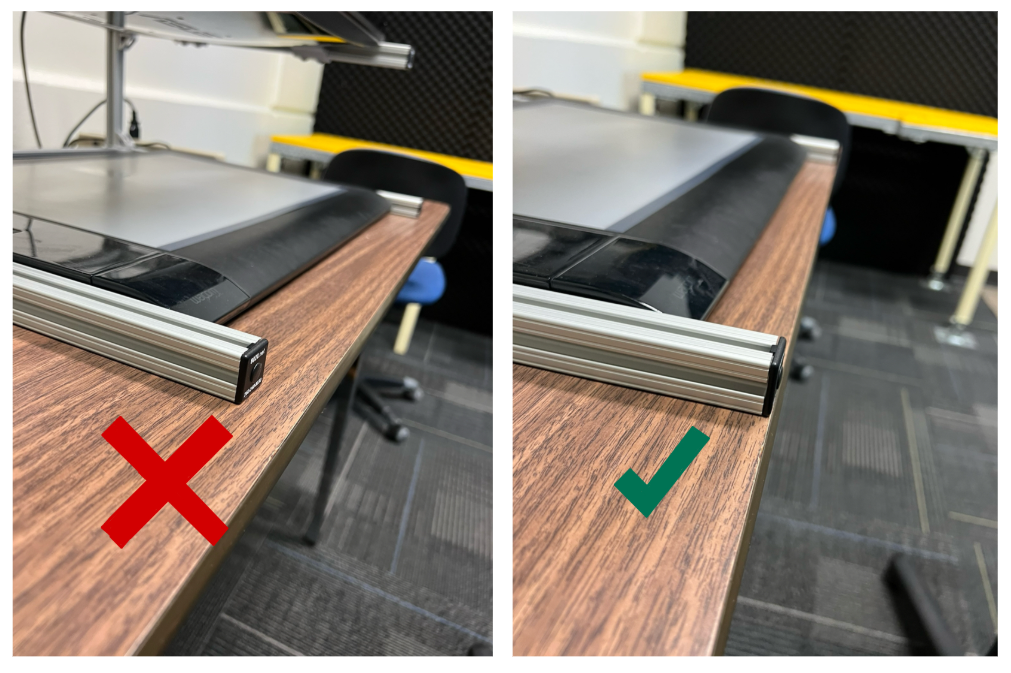
Ensure the frame is flush to the edge of the table (photo below)
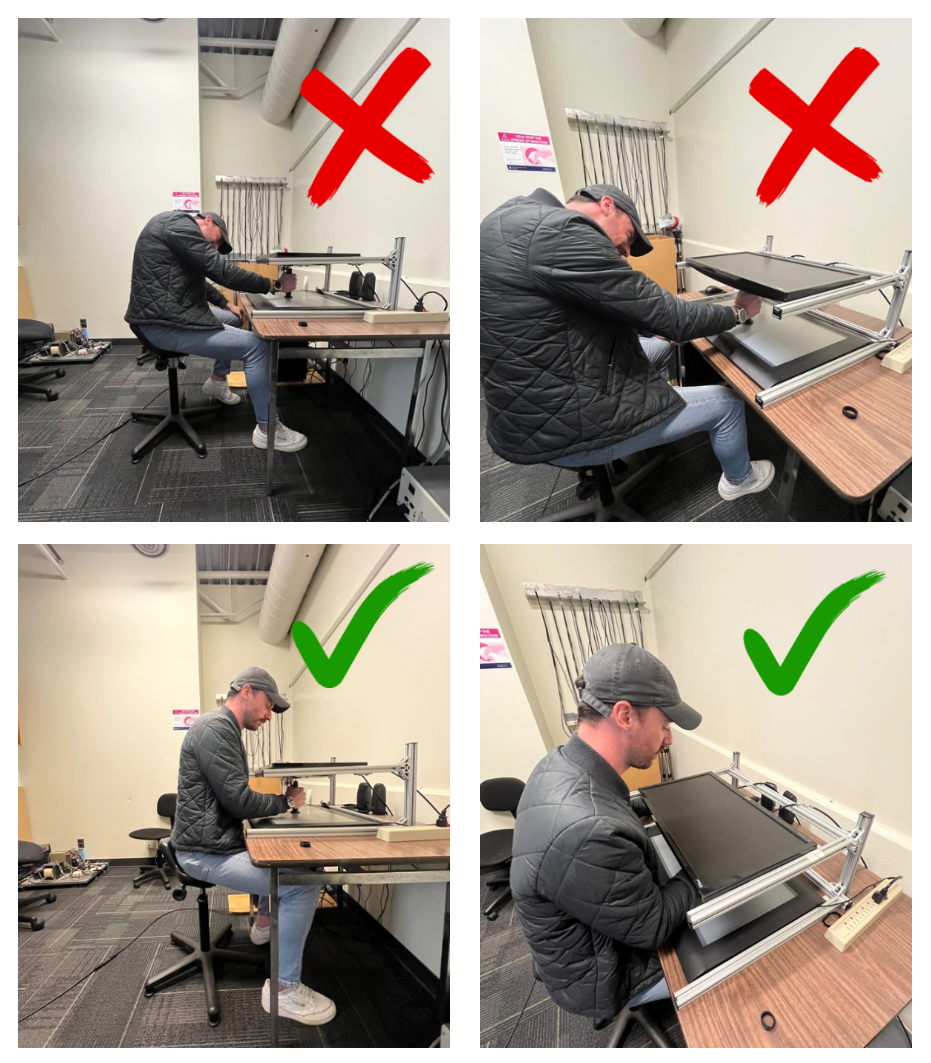
Ensure proper seating position (photo below) and that participant is not able to see their hand/arm. Participant should only be looking at the monitor.
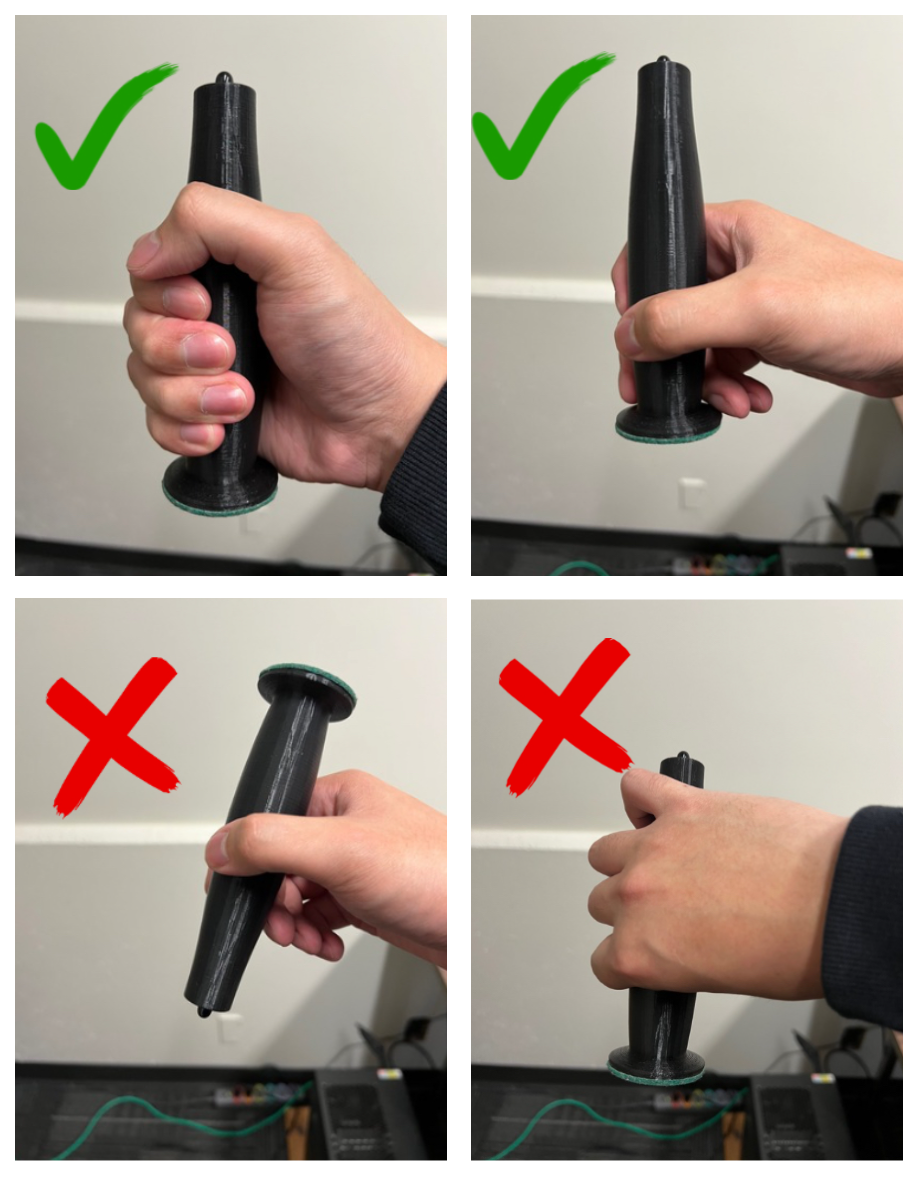
Instruct stylus use. Participants must only hold the stylus with a power grip (i.e. in a fist). (photo below)
Starting the Experiment
Using Kinarm Dexterit-E
Set yourself up as an operator within Dexterit-E, and select yourself as the operator before each session
Create a subject in Dexterit-E
Weight, height, and DOB are generally not needed — use a default value of 999 for weight/height, and any valid date for DOB
Leave subject ID as randomly generated
Click into “Custom Tasks” and select your task
Always calibrate before running each task by clicking “Calibrate”, ensure handles are not being grasped, then press “Reset zero”. The red X should turn into a green check
Once task is complete, follow our Data Management page to understand how/where data is stored, how to log onto dropbox, and how to record completion in the participant_key.xlsx.
Participant Script
Purpose of experiment
“The point of this experiment is to better understand how your brain controls and perceives reaching movements. The data we collect from you today may be used as part of a normative data set to compare with motor behaviors of various neurological patient populations, so please try your best to stay focused and follow all instructions.”
Basic instructions
“Throughout the experiment, there will be prompts and instructions on the screen. Please do your best to pay attention and follow all the instructions displayed.”
“In this experiment, you will be playing a game where you will be controlling a white cursor with a stylus. You will not be able to see your hand throughout the experiment, so the cursor will serve as the visual representation of your hand position.”
Stylus
[demonstrate]
“With the stylus, hold it at the base and ensure you are only sliding it along the tablet.”
Seat position and posture
[demonstrate]
“Scoot your seat in as close to the table as you can so that you’re able to make reaching movements without moving any other part of your body other than your arm. Adjust the height of the seat so you are able to maintain a comfortable, slight downward gaze onto the monitor.”
Additional instructions
[Specific to each study; link to each study or note if none]
Questions
“I will talk you through your first several trials but before we begin, do you have any questions?”
Set-up
“Give me a moment while I run the program. In the meantime, get seated and adjust your seat position and height. Once you’re ready to begin, I’ll turn off the lights and close the door.”
Finishing the Experiment
Checklist
Ask participants to sign the payment tracking sheet to confirm that they’ve received compensation
Provide participant with the money ($15)
Check that participant properly signed the consent form and payment tracking sheet
Thank participant for participating in the study!
Follow our Data Management page to understand how/where data is stored, how to log onto dropbox, and how to record completion in the participant_key.xlsx.
FAQs
How many more trials?/How much longer?
“I can’t say exactly how much longer it’ll take, but we are right on schedule.”
Can I take a break?
Breaks should be coded into the experiment, but participants are allowed to take extra breaks if needed.
Am I supposed to be fast or accurate?
Task-dependent; should be in experiment instructions.
What if I mess up a trial?/Can I redo a trial?
Experiment should account for the possibility of faulty trials.
“It’s totally fine if you mess up a few trials. Just try your best to be accurate moving forward.”
Is this supposed to get harder or easier?/Will the task change at some point?
Task-dependent.
“I can’t reveal that right now, but we can discuss after the experiment is over.”
“Just keep trying your best. I’ll let you know about any changes in the task.”
Will I get to see my results?/How well did I do?
“Data is anonymized and we aren’t able to share your individual results.”
“If you’re interested in study results, you can keep an eye on our website - we post all our publications.”
Common Issues
Late/Absent participants:
Day before session: Reminder email should be sent.
If participant does not show: Try to reschedule.
Distracted/Uninterested participants:
In the script, the participant is told that results may be used as a normative measure for patient populations, which usually encourages participants to take experiments seriously.
Ultimately, if a participant is still uninterested there is not much we can do about it. If a participant wants to stop the study for any reason, we must allow them to leave and compensate them anyways. Based on my experience, this would be an extremely rare occurrence (I’ve never had it happen, but never say never).
Technical issues:
The KINARM Hardware Guide offers some troubleshooting items to take note of.